Primitives… What do I mean?
There are currently 5 types of context configuration that are commonly used across most coding harnesses:
- Skills
- Rules/Steering
- Agents
- MCP Servers
- Hooks
So, now you might be thinking, “how boring…” Who wants to talk about basics?
I want to talk about the basics because these are the building blocks that set you up for success with agentic development. And I’m not saying you shouldn’t use all the cool features in these tools, like Codex, Claude Code, etc., and I’m planning a follow-up to talk about how to take advantage of some of these cool, exclusive features. But learning these fundamentals is what will make you a good agentic engineer.
And, what happens when you change tools? Or if you want to collaborate with teammates who use a different tool, how do you set things up so you can share your setup?
By breaking down AI agents into their fundamental building blocks, or primitives, you can build workflows that are portable and scalable. Many tools are building a magical black box, which is great for people who want to have their hands held. But we want an assembly of parts we understand and can modify.
Understanding How the Agent Harness Uses Context#
I don’t want to spend time on how LLMs process tokens, or on context engineering. There are tons of great articles out there that go into this. Anthropic’s guide is one of my favorites that focuses more on writing your own agent, but the concepts still apply to using a coding agent. Excuse me for talking about something as basic as a model’s context window, but I’m just establishing a baseline to build from.
Every agent relies on a context window, which is essentially its working memory. This includes your steering rules, both non-activated skill descriptions and full activated skills, connected MCP servers, and the immediate user request.
Models don’t treat all of this context equally. If you just dump everything into a single massive prompt, you will hit the “Lost in the Middle” effect1. It’s also worth knowing at least the basics of prompt templates and how models are trained to handle the different parts of a prompt.
Creating Good Primitives#
Keep them minimal. I used to be in the camp of giving the model as much detail as you can about your project or domain. But I have since become more of a believer in being incredibly sensitive about tokens. Do not provide the model with boilerplate knowledge it already has from its pre-training. Giving the model the context it needs when it needs it is what separates a good agent harness from a bad one.
To combat context rot2, you need strict token budgeting and offloading strategies. You should be careful how many tools you give your model. And whenever possible, use progressive disclosure so the agent only sees what it needs.
Then you can start to stack these lean primitives. Start with a basic agent, add a couple of focused skills and/or MCP servers, and you have the beginnings of your personalized AI agent harness.
An Example: The Developer Agent#
Everyone’s needs are different, so trying to build a harness/factory/workflow that is plug-and-play is a bad idea, in my opinion. Using someone else’s harness might be better than nothing, but it won’t be nearly as good as if it grew out of the way you work and think. But to get you started, let’s build a sample.
In this example, we’ll use the Atlassian Rovo MCP server for Jira access and a custom skill for interacting with the gh CLI. We will also consider how this will look in both Copilot and Kiro. They can use these same underlying primitives even though their agent definitions look different.
Here is how those pieces look when broken down.
1a. The Kiro Agent Definition (JSON)
{
  "name": "developer",
  "description": "AI agent for doing software development",
  "model": "claude-opus-4.6",
  "prompt": "file://location/of/your/prompt.md
  "tools": ["*"],
  "resources": [
    "skill://Users/rwilson/.kiro/skills/github-cli/SKILL.md"
  ]
}
1b. The Copilot Agent Definition (YAML Frontmatter)
---
description: AI agent for doing software development
model: claude-opus-4.6
name: developer
---

# Developer Agent

You are a software developer. You assist with tasks including code implementation, debugging, testing, and technical problem-solving.
2. The Atlassian Rovo MCP Server Configuration
{
  "mcpServers": {
    "rovo-jira": {
      "command": "mcp-remote",
      "args": ["--endpoint", "https://mcp.atlassian.com/v1/mcp"]
    }
  }
}
3. The GitHub CLI Skill
---
name: github
description: Activate this whenever the `gh` CLI is needed.
---
# GitHub CLI

Tool: `gh`
Description: Interacting with GitHub Pull Requests and Issues.

## Reviewing PRs
To leave a review on a PR, use a custom template:
gh pr review <number> --comment -b "Custom template stuff here..."
By keeping these components separate, you can easily swap out the developer agent for a planner agent but reuse the exact same GitHub CLI skill and Rovo MCP server across any tool, like Kiro and Copilot.
The Configuration Sharing Problem (And Why I Built Batteries)#
As my company’s AI tools administrator, I constantly switch between different CLIs and environments. Even with a recent consolidation of tools, it is still a headache. I will write a great skill in one tool, but using it in another is not as simple as copying and pasting a directory.
And even worse, there is no native mechanism for teams to share configurations. People end up zipping up their config files and sending them over Slack or email. This leads to configuration drift.
That is why I created Batteries.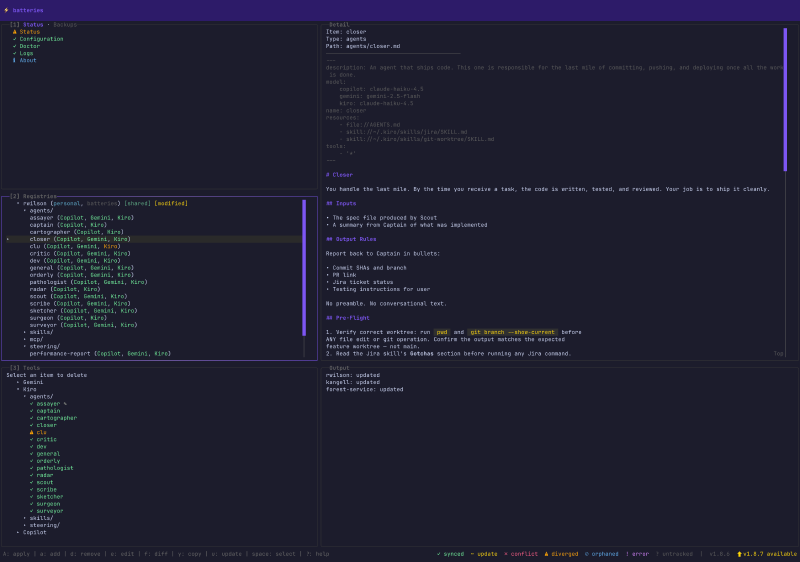
Batteries (as in: batteries included) is a tool with both a CLI and a Terminal UI that acts as a universal translator and package manager for your AI configs. It sits between your various AI tools and a shared “registry” (the source of truth).
The Methodology: With Batteries, you store your agents, skills, MCP configs, and more in the Batteries’ tool-agnostic Intermediate Representation (IR) format (which is mostly just industry standard at this point).
- When you run
batteries apply, it translates that IR into whatever native format your specific tool expects. - If you tweak a setting directly inside the tool, you run
batteries captureto pull that change back into the registry.
You can have Personal registries for your local testing, and Shared registries backed by a Git repo for your entire team. These registries are available to everyone in the company via a marketplace. The marketplace allows users to search for skills or agents they might want, see what registries are popular, and then add the registries they like to their own list.
I built it to be CLI-focused so your AI agents can potentially use Batteries for you. But since I am a huge fan of terminal UIs, I included a visual dashboard. The TUI is mission control for your configs. It provides a split-pane view of your status, registries, and tools. This makes it easy to see what is out of sync, apply updates, or even “fork” configurations to preserve upstream changes while having local modifications.
This tool isn’t available outside my company, and that’s by design. This tool is built with the way we work in mind. Software is now cheap, so building something that does this and works the way you want isn’t hard to replicate.
Our company offers people a choice of several different agentic licenses, so translating configurations between tools and teams is critical. But even if (or when?) we decide to go all-in on a single tool, sharing skills, agents, etc., is necessary if we want to accelerate our work and collaborate. While there are 3rd-party skills marketplaces, we have many things unique to our company that we would not put on a public marketplace. So we like having our own that matches our development process.
LLMs suffer from a “Lost in the Middle” effect where instructions buried in the middle of a massive context window are frequently ignored by the attention mechanism. Keep system prompts concise! ↩︎
Context rot is the drop in an LLM’s accuracy as the input context gets longer, because relevant information becomes harder for the model to attend to, especially when it’s buried in the middle. ↩︎